

DevOps Beyond Automation: The Quiet Evolution Powering Modern Innovation
For many people, DevOps is still misunderstood. They hear the word and think: Yes, DevOps uses tools.But DevOps is not a toolset.It’s a mindset upgrade in how modern teams think, build, collaborate, and ship ideas into the real world. The organizations winning today aren’t just writing code faster, they are shortening the distance between imagination and delivery. DevOps is how they do it. What DevOps Really Solves Before DevOps, software development lived in silos: Everyone worked hard, but rarely together. This created delays, blame cycles, stress, and wasted innovation. DevOps emerged not from technology, but from frustration. It answered one question: “How do we build software the way humans actually work, collaboratively, continuously, and with shared ownership?” Beyond Speed, DevOps Is About Confidence DevOps isn’t just about moving fast.Anyone can move fast and crash fast. DevOps means moving fast with confidence: Confidence that the code worksConfidence that deployments won’t fail

Top DevOps Trends and Technologies Shaping 2025
Top DevOps Trends and Technologies Shaping 2025 The DevOps world is evolving faster than ever. What began as a culture of collaboration between development and operations has now grown into a sophisticated ecosystem powered by AI, automation, and cloud-native architectures. As we enter 2025, the line between DevOps, platform engineering, and intelligent automation continues to blur, giving rise to faster, smarter, and more secure software delivery pipelines. In this article, we’ll explore the key DevOps trends and technologies shaping 2025, and what they mean for teams aiming to stay ahead in this new digital era. 1. AI-Driven DevOps (AIOps) Becomes Mainstream The integration of Artificial Intelligence in DevOps, often called AIOps, is transforming how teams monitor, predict, and resolve issues.Machine learning models now analyze logs, performance metrics, and user behavior in real time to detect anomalies and even fix them automatically. Why it matters:AIOps reduces downtime, accelerates incident response, and

Frontend vs Backend Development: Understanding the Difference
In web development, frontend and backend are terms you’ll hear often. While they work together to create functional websites and apps, they focus on very different aspects of the development process. Understanding the difference can guide aspiring developers and businesses in making the right decisions. What is Frontend Development? The frontend is everything users interact with directly. Often called the “client-side”, it handles the visual and interactive elements of a website or app. Key Points About Frontend Development: Focus: Visuals, Layout, and User Experience Frontend developers create interfaces that are visually appealing and easy to navigate. This includes colors, fonts, buttons, menus, and page layouts to ensure a smooth experience for users. Technologies Used: HTML: Provides the structure of a webpage (headings, paragraphs, images). CSS: Styles the webpage by controlling colors, spacing, and layouts. JavaScript: Adds interactivity, like pop-ups, sliders, and animations. Frameworks & Libraries: Tools like React, Angular, Vue.js,
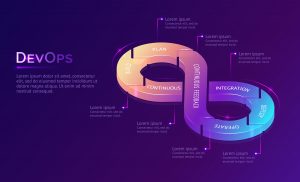
What is DevOps? A Formal Overview
Development (Dev) and IT operations (Ops) to shorten the software development life cycle. This methodology enables organizations to deliver new features, bug fixes, and updates with high quality and reliability. At its core, DevOps represents a cultural and professional movement that encourages seamless collaboration and communication between these two traditionally siloed teams. The Roles: Development vs. Operations To understand DevOps, it’s essential to define the core roles it unites: Development (Dev): This team consists of software engineers who are responsible for designing, writing, and improving code. Their primary focus is on building new features, fixing bugs, and ensuring the application meets user requirements. Common tools used by development teams include Git, Docker, and IDEs like Visual Studio Code. Operations (Ops): This team is composed of IT professionals and system administrators who manage the infrastructure and ensure software runs reliably. Their responsibilities include deploying applications to servers or cloud platforms, managing
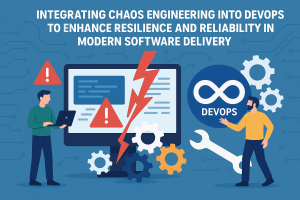
Integrating Chaos Engineering into DevOps to Enhance Resilience and Reliability in Modern Software Delivery
Chaos engineering is particularly relevant in DevOps, as it aligns with the DevOps principles of continuous improvement, automation, and resilience in software delivery. Here’s how chaos engineering applies in the DevOps world: 1. Continuous Testing and Validation of Resilience In DevOps, continuous integration (CI) and continuous delivery (CD) pipelines ensure that changes are consistently integrated, tested, and deployed with minimal downtime. Chaos engineering extends this concept by adding continuous testing of system resilience. For example, incorporating chaos experiments in CI/CD pipelines enables teams to automatically simulate failures in pre-production or production environments, ensuring each deployment can handle disruptions. 2. Enhanced Monitoring and Observability Chaos engineering experiments highlight the importance of monitoring and observability, which are key aspects of a DevOps workflow. By intentionally disrupting services, teams can identify gaps in their monitoring systems and fine-tune alerting mechanisms. 3. Shift-Left Approach to Reliability DevOps has a strong focus on shifting left—meaning

Linux Shell Script and Command Line for Beginners
Introduction to Bash Scripting Definition of Bash Scripting A Bash script is a file containing a sequence of commands executed by the Bash program line by line. It allows you to automate tasks, such as navigating directories, creating files, or launching processes, by saving these commands in a script. Once created, you can execute the script to repeat the same sequence of steps multiple times. Advantages of Bash Scripting Bash scripting is a powerful tool for automating tasks in Unix/Linux systems. Here are some key benefits: Automation: Automates repetitive tasks, saving time and reducing the risk of manual errors. Portability: Scripts can run on various platforms, including Unix, Linux, macOS, and Windows (using emulators or virtual machines). Flexibility: Highly customizable and can be combined with other programming languages or tools. Accessibility: Easy to write and edit using any text editor. Most operating systems come with a built-in Bash interpreter. Integration: